
Mike Thompson
Developer reviews dashboards on laptop and monitor, suggesting a website accessibility audit.
Accessibility reviews often start by checking alt text, form labels, color contrast, and keyboard navigation—the very oversights this article warns can cost you.

Too many teams still tack on accessibility at the end—then wonder why forms fail, links confuse screen readers, and images hide meaning. This piece shows how that “afterthought” mindset quietly bleeds revenue and trust, and why making fixes part of the workflow pays off. For quick context on the broader landscape, see why digital accessibility must be a next priority.

Mobile is where customers decide fast—so small touch targets, low contrast, and unlabeled buttons are conversion killers. You’ll get a practical snapshot of what to prioritize first (think input labels, focus order, and readable type) and why it matters when most traffic is on phones. For principles that reinforce this, explore the section on prioritizing mobile accessibility.

Share or Print with:

Share
Mike Thompson

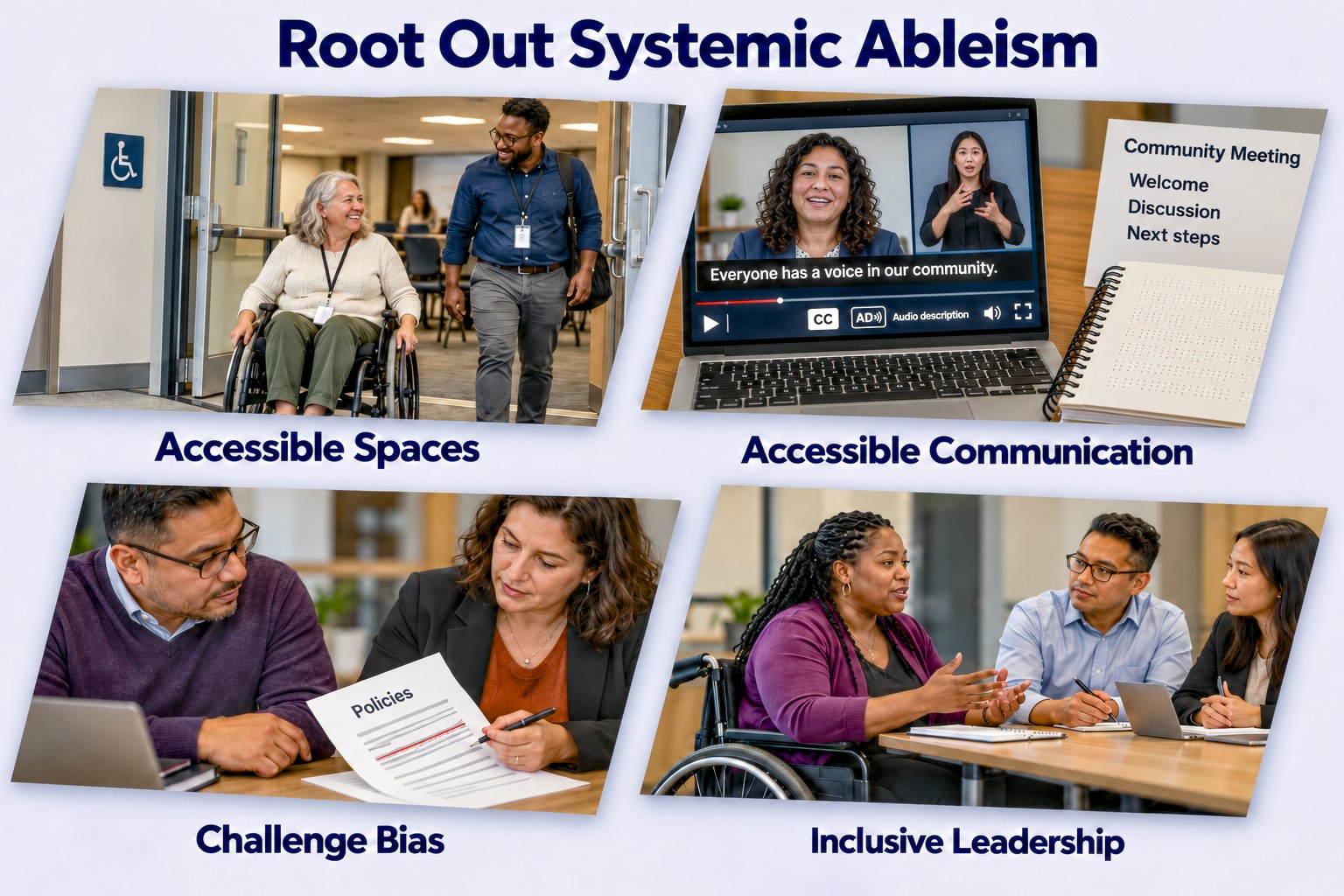
Four panels show a wheelchair user entering a step-free meeting space; video with captions, an ASL interpreter, and audio description alongside Braille and large-print materials; administrators revising policies to challenge bias; and a Black woman using a wheelchair leading a discussion with colleagues.

Who gets to participate—and who gets left out—often comes down to everyday administrative decisions. A meeting held in an inaccessible space, information shared in unusable formats, or policies shaped without People with Disabilities can turn exclusion into routine practice. This article examines how systemic ableism becomes embedded in community administration through physical and communication barriers, cultural biases, and underrepresentation in leadership. It offers practical actions: plan accessible events, use International Accessibility Standards, provide accessible materials, challenge stereotypes, and involve People with Disabilities in shaping policies and decisions. Building a vibrant community means making full participation, influence, and belonging part of how it operates.

Share or Print with:

Share
Mike Thompson
A formal headshot of Mark Riccobono, a Blind man, wearing a dark suit, white shirt, and light blue tie, holding a white cane with a black handle. The background is a soft blue gradient.
Mark Riccobono, President of the National Federation of the Blind, poses for a formal headshot. As a leader in the Blind community, he is known for his advocacy and efforts in removing barriers for People with Disabilities. The image captures his dignified and approachable demeanor.

Listen to the (Audio) version of this Banquet Speech, Orlando, 2024

Share or Print with:

Share
Mike Thompson
A Blind person's hands read a refreshable Braille display connected to a laptop. Three labels define image title, alt text, and caption.
A Focus 40 Braille display turns text from a screen reader into Braille. Blind and Low Vision readers use it to read information on any connected device, including image descriptions written as alt text. This works only when content follows the International Accessibility Standards.
Show/Hide Description

Overview: The infographic shows hands reading a refreshable Braille display connected to a laptop. Three labels explain image titles, alt text, and captions.

Image title label: Image titles identify images for reference.

Alt text label: Alt text describes visual elements without repeating captions.

Caption label: Captions provide context, including who is pictured, location, event, date, time, significance, background, and attribution.

Images carry information that Blind People and People with Low Vision receive only when a page supplies it as text. This article explains how alt text, captions, titles, and extended descriptions work together under Success Criterion 1.1.1 of the Web Content Accessibility Guidelines (WCAG) 2.2, shows how to decide whether an image is informative, decorative, functional, or complex, and explains that marking an informative image as decorative removes it from Blind readers. It states that anyone who publishes or distributes information to the community is responsible for making sure it is accessible, and it also gives guidance for describing people with respect and closes with questions for Community Builders to examine how their own images are described.

Share or Print with:

Share
Mike Thompson

An older woman squints at a phone displaying a magazine PDF with three tiny text columns and two photos, adjusting her glasses with her mouth slightly open in frustration. A magnifying glass rests on the open magazine beside “Continued on page 14.” Worn magazines and newspapers crowd the table, floor, and bookshelf among books, a family photo, and keys.

Print and PDF lock in the layout when the publisher saves the file, which leaves Blind People, People with Low Vision, older readers, and readers on phones unable to adjust it. This article sets out what the Nielsen Norman Group, the W3C accessibility standards, the Convention on the Rights of Persons with Disabilities, and large studies of PDFs show, answers the common defenses of print and PDF, and calls Community Builders to publish an adjustable web page first, consult People with Disabilities, and share the responsibility for access. It closes with eight questions for a reflection gathering.

Share or Print with:

Share
Mike Thompson

Clip Art representations of People with Various Disabilities on All Continents of the Globe

On May 16, 2024, we celebrated the 13th Global Accessibility Awareness Day (GAAD). This day is dedicated to raising awareness about digital access and inclusion for people with disabilities. But the conversation doesn't have to stop there—join us in continuing to spread awareness and drive change.

The GAAD Foundation, established in 2021 for GAAD's 10th anniversary, aims to revolutionize the tech industry by making accessibility a fundamental aspect of digital product development. Their mission underscores the importance of considering accessibility from the start, ensuring digital spaces are inclusive.

Digital accessibility is crucial for enabling people with disabilities to interact independently with digital content. However, WebAIM's 2020 analysis of one million home pages revealed significant accessibility barriers: 98.1% of pages had at least one WCAG 2.0 failure. Common issues include low contrast text, missing alt text, and empty links, highlighting the urgent need for improved digital design practices.

Share or Print with:

Share
Mike Thompson

A woman prepares to forward an email containing a community photograph. Across a diagonal divider, three youths sit at a table and two stand behind them. Four use phones; the seated blind youth uses a Braille display beside a folded white cane. One youth uses a wheelchair. A right-pointing arrow reads “Accessible? Forward.” A left-pointing arrow reads “Barriers? Return to sender.” The bottom banner reads “Check accessibility before forwarding.”

Can every member of your community read the email you are about to forward? A message that looks fine on your screen can reach a Blind reader as silence. Discover a quick way to see what a screen reader meets, seven questions that tell you whether a message passes, and a short note that asks the sender to fix what fails. Find out how to tell before you press Forward, so the message reaches the whole community.

Share or Print with:

Share
Mike Thompson

by Alex Chen

What is an image description?

An image description is a written caption that describes the essential information in an image.

Image descriptions can define photos, graphics, gifs, and video — basically anything containing visual information. Providing descriptions for imagery and video are required as part of WCAG 2.2 (for digital ADA compliance).

It’s sometimes referred to as alt text since the alt attribute is a common place to store them. The alt attribute appears in the HTML code like this:

<img src=”link” alt=”text goes here”>

While ALT Text and image descriptions are sometimes used synonymously, they’re not actually the same thing. Alt text refers to the text specifically added to the alt attribute, and is often short and brief. Image descriptions can be found in the alt text, caption, or body of the webpage and are often more detailed.

...

Additionally, image descriptions are a gesture of care and an essential part of accessibility. Without them, content would be completely unavailable to Blind/low vision folks. By writing image descriptions, we show support of cross-disability solidarity and cross-movement solidarity.

How to write a good image description

Share or Print with:

Share
Mike Thompson

On a computer screen, an image shows a cheerful Black man in dark glasses, navigating a wheelchair through a lush, natural environment. He appears to be going off a path surrounded by greenery. The image includes a tag stating, "ALT Text: A concise, accessible, descriptive, and inclusive label for photos, images, charts, and diagrams, allowing Blind People and others with disabilities to understand the content in context."

Dive into the art of crafting meaningful and inclusive ALT text that transcends mere identification. Explore a comprehensive resource collection to refine your skills and foster inclusive experiences. Learn to create ALT text that not only provides accessibility but also captures the essence of images. Uncover insights on customizing descriptions for various digital platforms and follow best practices for book covers, logos, and mastheads. Elevate the accessibility and inclusivity of your content by embracing the potential of descriptive ALT text.

Share or Print with:

Share

“Enduring and systemic injustices must be approached, understood, and challenged on their own terms, with efforts to redress them grounded in the actual experiences and knowledge of those that have endured them.” -Roshan Danesh and Douglas White III, Rising to the Challenge of Reconciliation, The Bahá’í World


Explore More Compelling Insights:

Learn about topics related to People with Disabilities, Accessibility, Anti-Ableism, Removing Barriers, and the Disability Community? Tap the Explore button to discover something new and intriguing with each tap!